One Pipeline, Every Platform
- Cloud economics, not preference, are propelling the shift toward ARM – AWS Graviton, Google Axion and Azure Cobalt now deliver substantially superior price-performance to comparable x86 instances at data-center scale.
- x86 remains firmly entrenched: legacy software, commercial databases and instruction-set-dependent workloads keep organizations tethered to it, which is why most now operate both architectures in parallel.
- BuildPiper’s multi-architecture build support eliminates the resulting duplication at the pipeline level – a single build definition yields correct AMD64 and ARM64 images, with no parallel pipelines to maintain.
The Shift Toward Multi-Architecture Infrastructure
For most of the last two decades, x86 was simply the default – Intel and AMD were the only chipmakers worth considering. That assumption is now eroding, propelled by cloud economics rather than preference. Cloud providers have engineered their own ARM-based silicon – AWS Graviton, Google Axion, Microsoft Azure Cobalt, because ARM chips deliver substantially better performance per watt than comparable x86 hardware, and at data-center scale, that differential compounds into significant savings. The compatibility barrier that once made ARM migrations arduous has largely dissolved as well: most modern tooling now ships native ARM64 support.
Even so, x86 remains indispensable in places. Commercial databases, legacy enterprise software and workloads tuned to x86-specific instruction sets are frequently certified or optimized for that architecture specifically and re-platforming them rarely justifies the engineering investment required. The upshot: most organizations now operate both architectures within the same fleet and a container image compiled for x86 simply will not execute an ARM64 node. BuildPiper’s multi-architecture builds support resolves that constraint, generating correct AMD64 and ARM64 images from a single build definition, so architecture becomes a deployment decision rather than a build-time limitation.
What Is BuildPiper Multi-Architecture Build Support?
BuildPiper Multi-Architecture Build Support is a native CI/CD capability that enables you to build container images for multiple CPU architectures -AMD64 (x86_64) and ARM64 – from a single pipeline, without maintaining separate build configurations for each platform.
In practice, you define your build once in BuildPiper and the platform handles the rest – producing images that run correctly on x86 servers, ARM-based platforms like AWS Graviton and everything in between. Depending on your requirements, it can generate:
- Architecture-specific images – Architecture-specific images
- Multi-architecture images – a single image tag backed by a manifest list, which automatically resolves to the correct architecture for whichever machine pulls it
This is what distinguishes BuildPiper’s approach to multi-arch builds.
How to Enable Multi-Architecture Builds in BuildPiper (Step-by-Step)
Configuring this in BuildPiper involves two stages: a one-time system-level setup, performed by an administrator, followed by a per-pipeline toggle that any team can activate for their own build whenever they want it to go multi-arch.
Step 1: Enable Buildx at the System Level
Multi-architecture builds in BuildPiper are powered under the hood by BuildX, and this must be activated once at the platform level before any pipeline can use it.
Navigate to BP System Global Settings → System Properties and search for “buildx”. You’ll find two relevant settings: Buildx Support and Buildx Remote SSH Endpoint.
a) Buildx Support
Configure the property that enables Buildx for the entire system:
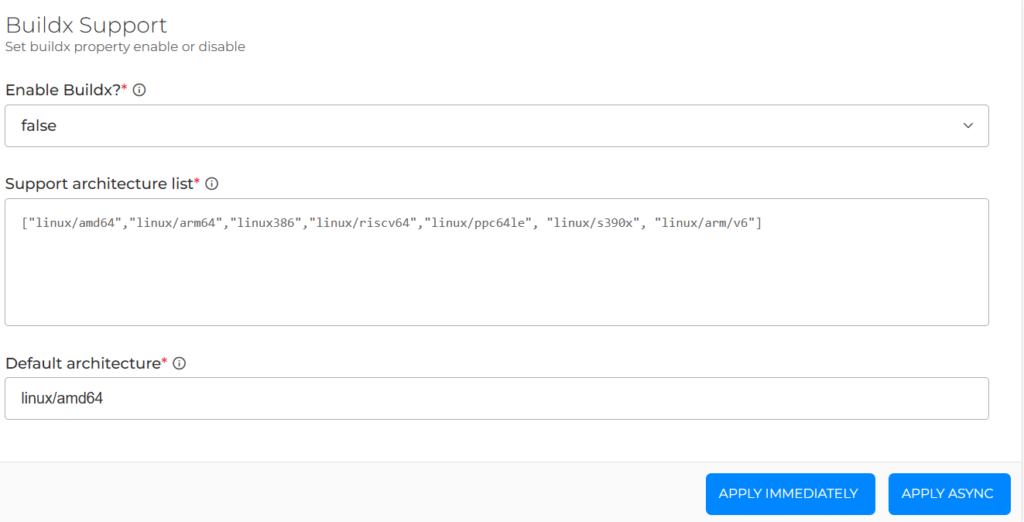
- Enable Buildx – set this to true to activate the feature
- Support architecture list – the complete set of platforms BuildPiper is permitted to build for, e.g.
[“linux/amd64″,”linux/arm64″,”linux/386″,”linux/riscv64″,”linux/ppc64le”,”linux/s390x”,”lin
ux/arm/v6″] - Default architecture – the fallback platform (typically linux/amd64) applied when no specific platform is selected
Once configured, select Apply Immediately to activate it right away or Apply Async to roll it out asynchronously.
b) Buildx Remote SSH Endpoint
Configure this if you want multi-arch builds to execute on a remote SSH-based builder rather than locally:
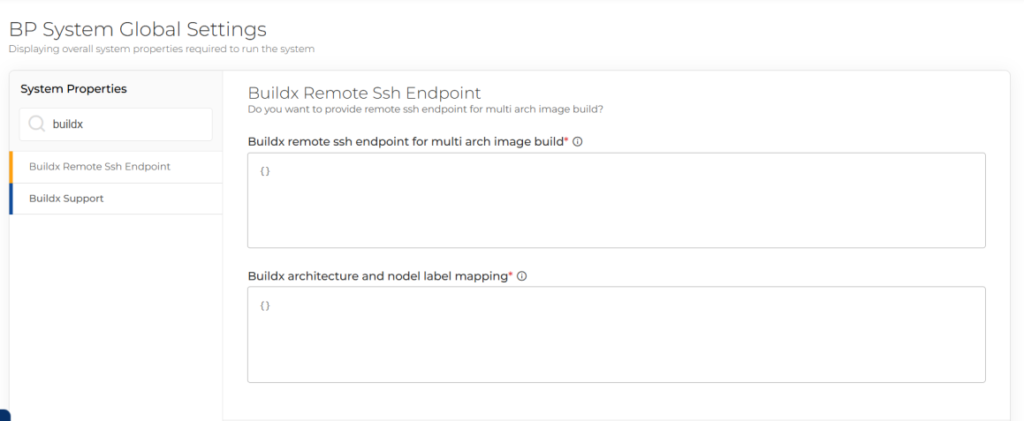
- Buildx remote SSH endpoint for multi-arch image build – connection details for the remote builder
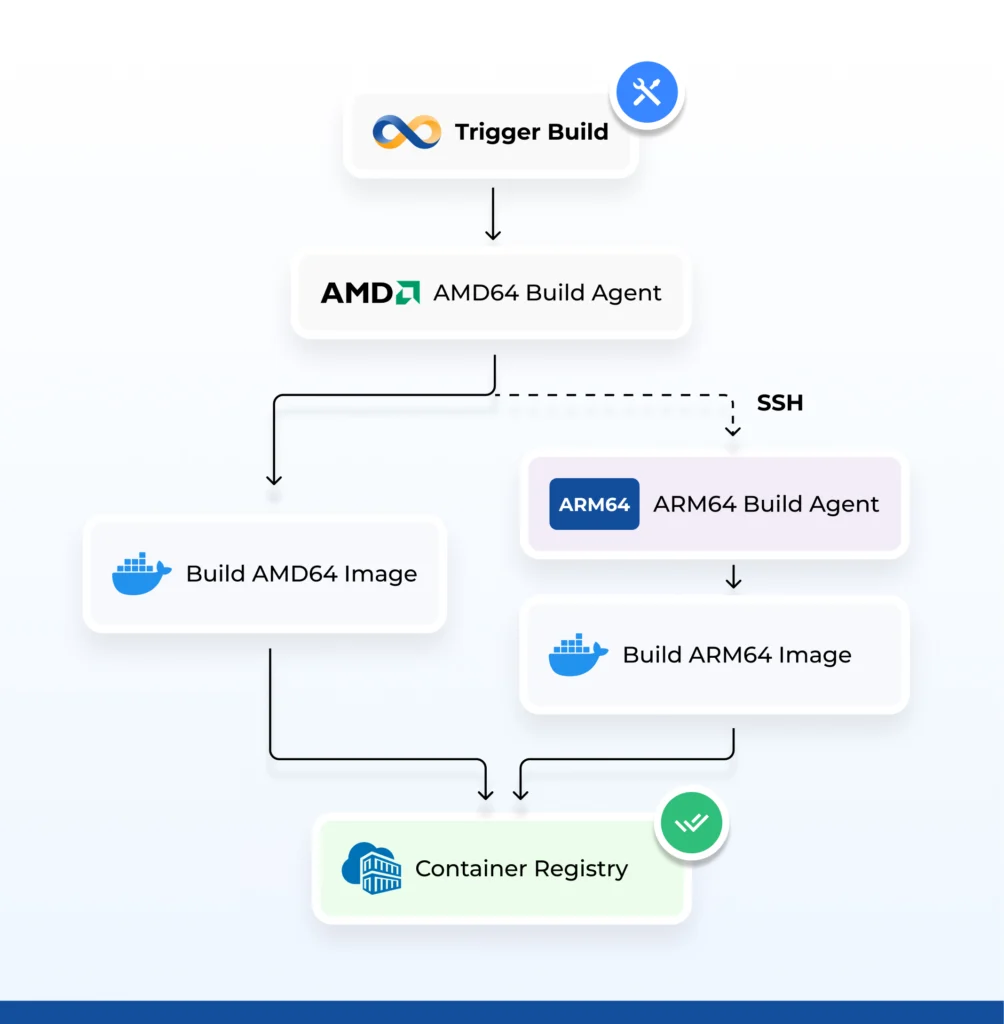
- Buildx architecture and node label mapping – which architectures correspond to which build nodes, useful when dedicated ARM64 and AMD64 build agents are in use
Step 2: Turn On Multi-Arch Inside Build Details
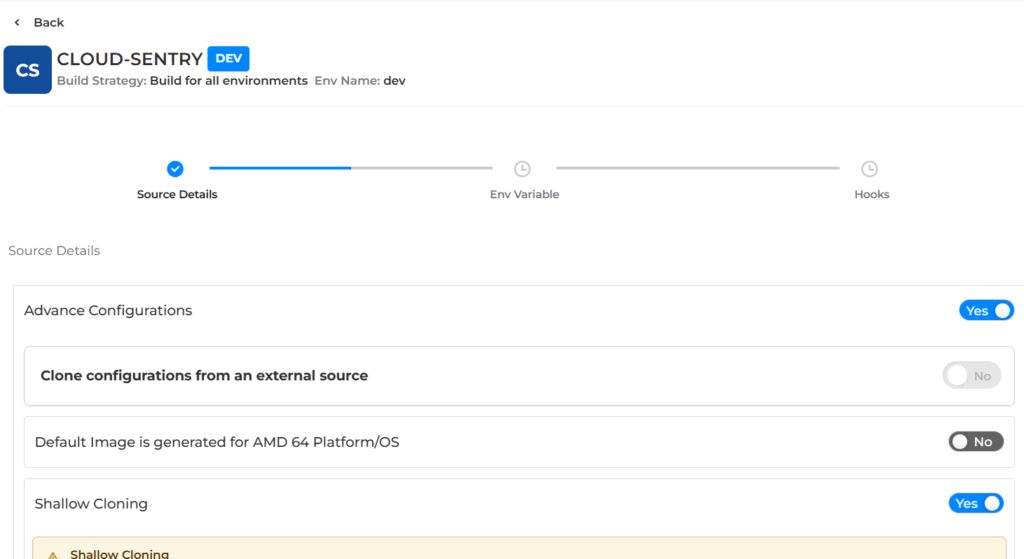
Once Buildx is enabled system-wide, navigate to the specific Build Details of the pipeline you wish to configure, open its Source Details step, and scroll to Advance Configurations.
a) Enable Advance Configurations
Switch Advance Configurations to Yes. This reveals the “Default Image is generated for AMD 64 Platform/OS” toggle, which is Off (No) by default- meaning the pipeline currently produces a single standard AMD64 image:
b) Turn on the multi-arch toggle and select platforms
Set “Default Image generated for AMD 64 Platform/OS” to Yes. This is the actual multi-arch build switch – activating it unlocks a Select Platforms panel where you specify exactly which architectures this pipeline should build for: linux/amd64, linux/arm64, linux/386, linux/riscv64, linux/ppc64le, linux/s390x, linux/arm/v7, linux/arm/v6 or simply select All:
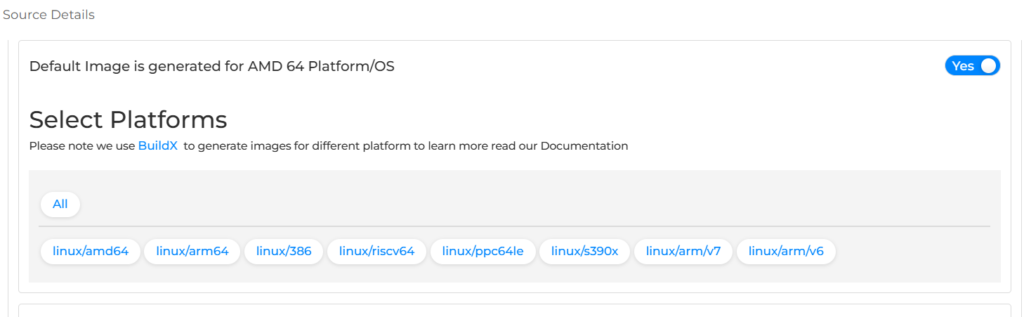
That’s the entire process. On the next run, BuildPiper leverages BuildX behind the scenes to produce images for every platform you selected, from that same pipeline, without requiring any additional scripting.
Why BuildPiper Multi-Arch Support Matters
- Portability across infrastructure — Applications built with multi-arch support run consistently regardless of whether they land on a conventional cloud VM or an ARM-based host – increasingly relevant as more cloud providers promote ARM options for their priceperformance advantages.
- Simplified CI/CD workflows — A single pipeline to define, review, and maintain – not two or three. Fewer moving parts translates to less room for configuration drift, and faster onboarding for new services.
- Reduced operational overhead — Platform and DevOps teams no longer need to reconcile separate build definitions every time a dependency changes or a security patch must roll out. A single source of truth keeps builds consistent across architectures.
- Cost and performance flexibility — With ARM64 platforms like Graviton frequently delivering substantial cost and power efficiency gains, multi-arch support affords organizations the freedom to migrate workloads toward ARM where it makes sense – without being constrained by the build system.
- Automatic architecture resolution at deploy time — Although BuildPiper builds for multiple architectures, deployment doesn’t require any manual platform selection, when a deployment is triggered, the correct artifact is automatically fetched based on the target machine’s architecture, so the right image always lands on the right host.
- Future-proofing — As heterogeneous infrastructure becomes the norm rather than the exception, teams that already build multi-arch images by default are positioned to adopt new hardware platforms without re- architecting their CI/CD process.
The Bottom Line: BuildPiper Makes Multi-Arch Effortless
Multi-architecture build support isn’t merely a convenience – it reflects where infrastructure is heading. As ARM-based platforms like Graviton assume a larger share of the cloud landscape, the ability to build once and deploy anywhere, irrespective of underlying CPU architecture, shifts from a nice-to-have to a genuine competitive advantage.
With BuildPiper, that capability is built directly into the pipeline – no duplicated workflows, no architecture-specific technical debt, just a single build process that adapts to wherever your application needs to run.
FAQs
What’s the difference between architecture-specific and multi-platform images in BuildPiper?
An architecture-specific image is built for exactly one platform – just AMD64 or just ARM64 – for workloads that only ever target one architecture. A multi-platform image is a single tag backed by a manifest list, so the same reference automatically resolves the correct architecture for whichever machine pulls it.
Do I need to change my pipeline configuration to support multiple architectures?
No. Once Buildx is enabled at the system level and the multi-arch toggle is switched on for a pipeline, BuildPiper handles architecture-specific compilation and packaging automatically – there’s no architecture-aware branching logic to write into the CI/CD config.
Which architecture does BuildPiper support beyond AMD64 and ARM64?
The platform list includes:- linux/386, linux/riscv64, linux/ppc64le, linux/s390x, linux/arm/v7, and linux/arm/v6, alongside linux/amd64 and linux/arm64 or you can simply select All to build for every supported platform at once.
Can multi-arch builds run on a remote builder instead of locally?
Yes. The optional Buildx Remote SSH Endpoint configuration lets multi-arch builds run on a remote SSH-based builder, with architecture-to-node mapping so ARM64 and AMD64 work can be routed to dedicated build agents.
Related Searches
- How to Create a Dockerfile?
- Docker Images vs Containers: Explore the Differences
- How to Build Multiple Images from One CI/CD Trigger Using Secondary Builds
- Top DevSecOps Consulting Companies in India 2026